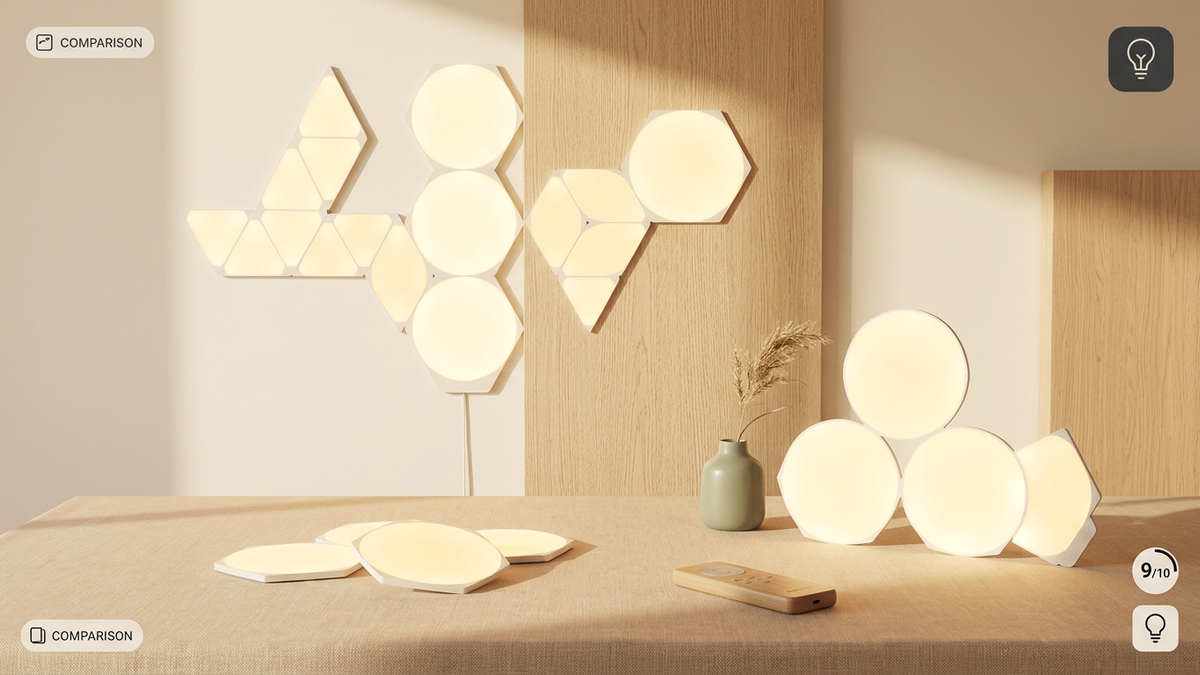
Nanoleaf Smart Lighting Ecosystem 2026: Your Guide to Dynamic Design & Smart Control
Transform your living space with dynamic, personalized lighting that adapts to your mood and activities. The Nanoleaf smart lighting ecosystem in 2026 offers an unparalleled blend of artistic design and advanced control, allowing you to craft truly immersive environments. From vibrant gaming setups to serene ambient lighting, Nanoleaf empowers you to paint with light.
- Nanoleaf provides a modular, customizable smart lighting system with various panel shapes, lightstrips, and functional lights.
- The Nanoleaf App is your central hub for design, customization, and smart home integration in 2026.
- Consider your aesthetic goals, room layout, and smart home platform (Apple HomeKit, Google Home, Alexa, Matter) for optimal product selection.
- Key features like Screen Mirror, Rhythm Music Visualizer, and Schedules enhance functionality and entertainment.
- Proper planning, installation, and a stable Wi-Fi network are crucial for seamless performance and responsiveness.
Understanding the Nanoleaf Ecosystem in 2026: More Than Just Lights
Nanoleaf has solidified its position as a pioneer in decorative smart lighting, evolving beyond simple bulbs to offer modular, artistic installations. The ecosystem in 2026 is built on a foundation of modularity, personalization, and broad smart home compatibility, allowing users to combine different light panels, lightstrips, and bulbs to create unique visual experiences.
Nanoleaf's Diverse Product Lines for 2026
The Nanoleaf portfolio in 2026 offers a wide array of products, each designed to serve different aesthetic and functional needs:
- Light Panels (Shapes, Canvas, Elements): These are the iconic modular panels that connect to form geometric designs. Shapes (Hexagons, Triangles, Mini Triangles) offer vibrant RGBW lighting for dynamic effects. Canvas provides square panels with unique touch control features. Elements introduce a sophisticated wood-grain finish, perfect for a more natural, ambient aesthetic.
- Essentials: This line includes smart bulbs and lightstrips, offering foundational smart lighting functionality. In 2026, these products boast enhanced Matter compatibility, ensuring broad integration with virtually any smart home platform.
- Lines: These sleek, backlit LED light bars connect at 60-degree angles, creating futuristic linear designs that add a modern glow to any space.
- 4D & Lightstrips: The Nanoleaf 4D Screen Mirror system and standard Nanoleaf PC Screen Mirror Lightstrips are game-changers for entertainment, syncing your lighting with on-screen content for an immersive experience.
- Skylight: A significant innovation, Nanoleaf Skylight offers modular ceiling panels that provide both functional overhead lighting and ambient mood lighting, integrating seamlessly with your existing Nanoleaf setup.
- Outdoor & Decorative Accents: Newer additions like Nanoleaf Solar Garden Lights and the Nanoleaf Smart Rope Light extend the ecosystem's reach to outdoor spaces and flexible indoor accents, offering even more creative possibilities.
Designing Your Nanoleaf Layout: Unleash Your Creativity
The true magic of Nanoleaf lies in its capacity for creative expression. These panels aren't just lights; they are dynamic art pieces that transform your walls and ceilings.
Strategic Planning for Your Installation
- Vision & Placement: Start by envisioning the role your Nanoleaf installation will play. Is it a focal point for a gaming room, an ambient backdrop for a living area, or a functional yet artistic ceiling light? Common areas include gaming setups, accent walls, bedrooms, and home offices.
- Shape & Aesthetic: Choose the panel type that best fits your desired aesthetic. Hexagons and Triangles offer vibrant, geometric patterns, while Lines provide a sleek, linear, and modern feel. Elements add a touch of natural elegance with their wood-grain finish.
- Layout Design: Utilize the Nanoleaf Layout Assistant tool within the app or on their website. This invaluable virtual planner allows you to experiment with various configurations, visualize the final look, and calculate the precise number of panels and power supplies required for your design.
- Power Considerations: Each Nanoleaf controller has a limit on the number of panels it can power (e.g., up to 21 Hexagons). For larger, more elaborate designs, you may need multiple power supplies and controllers. Plan your layout to ensure all panels are within reach of an outlet and that power distribution is adequate.
Mounting & Installation Best Practices
- Surface Preparation: A clean, dry, and smooth mounting surface is paramount for optimal adhesive performance. Wipe down the area with a damp cloth and let it dry completely.
- Test Layout First: Before peeling off any adhesive, temporarily arrange your panels on the floor or use painter's tape to mark their exact positions on the wall. This allows for adjustments without damaging your walls or panels.
- Secure Connections: Ensure the linker pieces between panels are firmly seated. Loose linkers can lead to inconsistent power, unresponsive panels, or flickering lights.
- Adhesive Strips: Nanoleaf uses strong, double-sided adhesive. Apply firm, even pressure for at least 30 seconds to each panel. For less permanent solutions or if you anticipate moving your setup, consider using screw mounts (available for some products) or high-quality Command Strips.
Controlling Your Nanoleaf Ecosystem: The App & Beyond
The Nanoleaf experience is anchored by its robust control system, primarily managed through the intuitive Nanoleaf App (available for iOS and Android). In 2026, the app continues to evolve, offering more refined controls, deeper customization, and enhanced smart home integration.
The Nanoleaf App: Your Central Command
- Scene Creation & Discovery: Design custom lighting scenes with specific colors, animations, and brightness levels. Save your favorites for instant recall. Explore the vast library of user-created scenes in the Discover tab and download new looks for your setup.
- Rhythm Music Visualizer: Activate the built-in microphone (on panels or via the app) to make your lights react to music in real-time. This creates a captivating audio-visual experience that transforms any room into a party or a serene soundscape.
- Screen Mirror: For the ultimate entertainment setup, the Screen Mirror feature (available with Nanoleaf 4D or PC Lightstrips) extends the colors from your screen onto your panels. This immerses you deeper into movies, games, or shows, blurring the lines between your screen and your environment.
- Schedules & Automations: Automate your lighting to turn on/off, change scenes, or adjust brightness at specific times, based on sunrise/sunset, or triggered by other smart home events.
- Layout Assistant: As mentioned, this integrated tool simplifies the planning and visualization of your panel designs.
Seamless Smart Home Integration in 2026
Nanoleaf products are engineered for broad compatibility, ensuring they fit effortlessly into most modern smart homes. Key integrations include:
- Matter: Many Nanoleaf products, particularly the Essentials line and newer panels, fully support Matter, the universal smart home standard. This allows for seamless control across different platforms like Apple Home, Google Home, and Amazon Alexa, simplifying your smart home ecosystem.
- Apple HomeKit: Nanoleaf products are deeply integrated with Apple HomeKit, allowing control via the Home app, Siri voice commands, and inclusion in HomeKit automations.
- Google Home: Control your Nanoleaf lights using Google Assistant voice commands and integrate them into your Google Home routines.
- Amazon Alexa: Enjoy voice control and integrate Nanoleaf into your Alexa routines for a hands-free experience.
- Razer Chroma & Corsair iCUE: For gamers, Nanoleaf offers direct integration with popular PC gaming ecosystems, syncing your lighting with in-game events and your other RGB peripherals.
- IFTTT (If This Then That): Expand your automation possibilities by connecting Nanoleaf to a vast array of other services and devices through IFTTT.
Troubleshooting Common Nanoleaf Issues in 2026
While Nanoleaf systems are generally reliable, occasional issues can arise. Here's how to address some common problems:
- Lights Not Responding: Check your Wi-Fi connection. Ensure your Nanoleaf controller is powered on and connected to your network. A simple power cycle (unplugging and replugging the controller) often resolves this. For persistent issues, refer to our Fix Smart Lighting Not Responding: Nanoleaf & Philips Hue 2026 guide.
- Panels Not Lighting Up: Verify all linker connections are secure. Ensure your power supply is adequate for the number of panels in your layout.
- Difficulty Pairing: Make sure your phone is on the same 2.4GHz Wi-Fi network as your Nanoleaf device during initial setup. Try moving closer to the panels.
- Flickering Lights: This can indicate a loose linker, an overloaded power supply, or a weak Wi-Fi signal. Check connections and consider reducing the number of panels on a single controller if it's nearing its limit.
The Future of Nanoleaf: Innovation in 2026 and Beyond
Nanoleaf continues to push the boundaries of smart lighting. In 2026, expect further advancements in:
- Matter Integration: Deeper and more seamless integration with the Matter standard across all new products, simplifying setup and control.
- AI-Powered Customization: More intelligent scene suggestions and adaptive lighting based on user habits, time of day, and even biometric data (with user permission).
- Expanded Form Factors: New and innovative shapes, textures, and functional lighting solutions that blend even more seamlessly into home decor.
- Energy Efficiency: Continued focus on energy-efficient LED technology and smart power management to reduce environmental impact and electricity bills.
Conclusion: Light Up Your World with Nanoleaf in 2026
The Nanoleaf smart lighting ecosystem in 2026 offers an unparalleled opportunity to infuse your home with personalized light and artistic expression. Whether you're a gamer seeking ultimate immersion, a designer crafting unique ambiances, or simply looking to enhance your everyday living, Nanoleaf provides the tools to create a truly dynamic and responsive environment. By understanding its diverse product lines, leveraging its powerful app, and embracing smart home integration, you can unlock the full potential of your Nanoleaf setup.
What is the main difference between Nanoleaf Shapes and Elements?Nanoleaf Shapes (Hexagons, Triangles) offer vibrant RGBW (color-changing) lighting with a plastic finish, ideal for dynamic and colorful effects. Nanoleaf Elements feature a wood-grain laminate finish and provide tunable white light (from warm to cool), designed for a more natural, ambient, and sophisticated aesthetic.
Can I combine different Nanoleaf panel shapes in one layout?Yes, Nanoleaf's Connect+ technology allows you to combine different Shapes panels (Hexagons, Triangles, Mini Triangles) and even Canvas panels within a single layout, controlled by one power supply and controller. Elements panels, however, are generally not cross-compatible with Shapes/Canvas due to their distinct design and lighting capabilities.
Do Nanoleaf products require a hub?No, most Nanoleaf products connect directly to your home Wi-Fi network and are controlled via the Nanoleaf App. They do not require a dedicated hub. However, some products act as Thread Border Routers, which can enhance the responsiveness and reliability of other Thread-enabled devices in your smart home ecosystem.
Is Nanoleaf compatible with Matter in 2026?Yes, many Nanoleaf products, particularly the Essentials line (bulbs and lightstrips) and newer panel products, are fully compatible with Matter in 2026. This allows for seamless integration and control across various Matter-enabled smart home platforms like Apple Home, Google Home, and Amazon Alexa.
What's the best way to clean my Nanoleaf panels?To clean your Nanoleaf panels, gently wipe them with a soft, dry, or slightly damp cloth. Avoid using harsh chemicals, abrasive cleaners, or excessive moisture, as these can damage the panel surface or internal electronics.